
AI-powered coding assistants are no longer optional for modern developers. They directly influence productivity, code quality, and learning speed. Two names dominate this space today: Cursor and GitHub Copilot. While both promise faster development, they approach AI-assisted coding very differently.
This detailed comparison breaks down Cursor vs Copilot across features, workflows, performance, pricing, and real-world use cases. By the end, you’ll know exactly which tool fits your development style and goals.
Introduction to Cursor vs Copilot
Cursor vs Copilot is a comparison every developer eventually faces when adopting AI-assisted coding. Both tools integrate artificial intelligence into daily programming tasks, but they target different pain points in the development lifecycle.
Cursor focuses on deep code understanding and AI-native editing, while Copilot emphasizes inline code completion inside familiar editors. Understanding these differences is critical before choosing a long-term tool.
What Is Cursor?
1. AI-First Code Editor Experience
Cursor is a standalone, AI-native code editor designed around conversational coding. Instead of merely suggesting lines of code, it understands entire repositories and allows developers to modify code through natural language instructions.
Cursor enables developers to refactor files, generate functions, and debug logic by chatting directly with the editor. This makes it especially powerful for complex or unfamiliar codebases.
2. Deep Context Awareness
Cursor indexes the full project, giving it strong contextual awareness. It can explain why code behaves a certain way, suggest architectural improvements, and update multiple files simultaneously without losing context.
What Is GitHub Copilot?
1. Inline AI Code Suggestions
GitHub Copilot works as an extension inside popular editors like VS Code and JetBrains. It provides real-time code suggestions as you type, completing lines, functions, and even entire blocks.
Copilot shines in speed. It reduces keystrokes and accelerates common coding tasks without changing your workflow.
2. Familiar Developer Workflow
Because Copilot lives inside existing IDEs, developers don’t need to learn a new editor. This makes adoption easy, especially for teams already standardized on VS Code or JetBrains tools.
Cursor vs Copilot: Core Feature Comparison
1. Code Understanding and Context
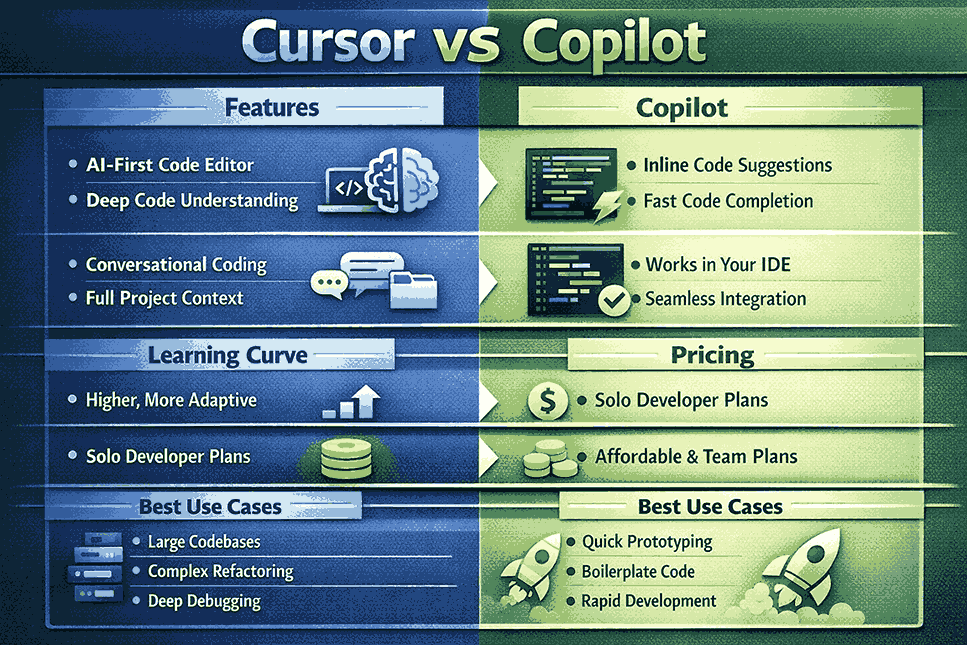
Cursor offers deeper understanding by indexing the entire repository. It can reason across files and suggest holistic changes. Copilot focuses on local context near the cursor, which is faster but sometimes less accurate for large projects.
2. Editing and Refactoring Capabilities
Cursor allows developers to instruct the AI to refactor, rewrite, or explain code using natural language. Copilot primarily generates code snippets but relies on developers to integrate and adjust them manually.
Cursor vs Copilot: Developer Workflow Differences
1. How Cursor Changes Coding Style
Cursor encourages a conversational approach to development. Developers can ask questions, request refactors, and explore logic interactively. This works well for exploratory coding and learning-heavy environments.
2. How Copilot Enhances Existing Habits
Copilot blends seamlessly into existing workflows. Developers type code as usual while Copilot silently assists. This minimizes disruption but limits deeper AI-driven transformations.
Cursor vs Copilot Performance and Accuracy
1. Handling Large Codebases
Cursor performs better when navigating large repositories. Its ability to understand project-wide context improves accuracy during refactors and debugging.
Copilot performs well for isolated functions or repetitive patterns but may lose accuracy when dependencies span multiple files.
2. Bug Fixing and Debugging
Cursor excels at explaining errors and suggesting fixes with reasoning. Copilot can suggest fixes but rarely explains why a bug exists, making Cursor more useful for debugging complex logic.
Cursor vs Copilot Pricing and Accessibility
1. Cost Structure
Cursor typically offers a subscription model focused on individual developers and power users. Copilot offers competitive pricing and is often bundled or discounted for students and open-source contributors.
2. Team and Enterprise Readiness
Copilot integrates well with enterprise GitHub workflows, making it easier for teams to adopt at scale. Cursor is improving team features but currently appeals more to solo developers and startups.
Use Cases: When to Choose Cursor or Copilot
1. Best Scenarios for Cursor
Cursor is ideal for developers working with large codebases, refactoring legacy systems, or learning new frameworks. It’s also excellent for engineers who prefer reasoning and explanations alongside code.
2. Best Scenarios for Copilot
Copilot is best for fast-paced development, boilerplate-heavy tasks, and teams that want minimal workflow changes. It excels at accelerating coding rather than transforming how you code.
Common Mistakes When Choosing Between Cursor vs Copilot
1. Choosing Based Only on Hype
Many developers choose tools based on trends rather than workflow fit. Cursor and Copilot serve different needs, and choosing the wrong one can reduce productivity.
2. Ignoring Learning Curve
Cursor requires time to adapt to its AI-driven workflow. Copilot is easier to adopt but offers less depth. Understanding this tradeoff is crucial.
FAQ
Is Cursor better than Copilot for beginners?
Cursor can be better for beginners who want explanations and guided learning. Copilot is better for beginners who already understand syntax and want speed.
Can I use Cursor and Copilot together?
Yes, some developers use Cursor for deep refactoring and Copilot for quick inline suggestions, though this requires switching environments.
Which tool is better for large projects?
Cursor generally performs better for large, complex projects due to its full-repository awareness.
Does Copilot replace human code reviews?
No, Copilot assists with writing code but does not replace code reviews, architectural decisions, or testing.
Is Cursor worth the learning curve?
For developers working on complex systems or learning new stacks, Cursor’s learning curve is often worth the productivity gain.
Conclusion: Cursor vs Copilot
Cursor vs Copilot is not about which tool is objectively better, but which aligns with your workflow. Cursor offers deep understanding, refactoring power, and conversational coding. Copilot delivers speed, familiarity, and seamless integration.
If you value reasoning, explanations, and large-scale code changes, Cursor is the better choice. If you want fast, unobtrusive assistance inside your existing editor, Copilot remains unmatched.



Write a comment