
If you’re looking to create animated explainer videos, cartoon marketing content, or engaging storytelling videos, you’ve likely come across Vidtoon and Toonly. Both tools promise easy drag-and-drop animation without technical skills, but they serve slightly different purposes.
This in-depth Vidtoon vs Toonly comparison breaks down features, pricing, ease of use, animation quality, and ideal use cases so you can confidently choose the right software for your goals.
Introduction to Vidtoon vs Toonly
Vidtoon vs Toonly is a common comparison among marketers, YouTubers, educators, and small businesses. Both tools simplify animation creation, but their focus and strengths differ significantly depending on whether you want cinematic storytelling or quick marketing explainers.
What Is Vidtoon?
1. Overview of Vidtoon
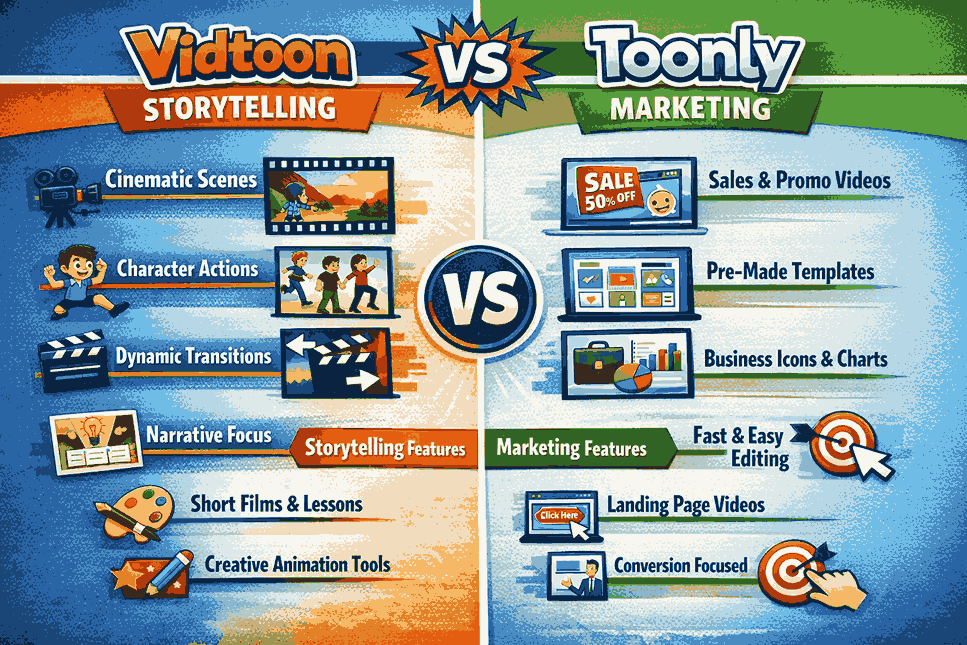
Vidtoon is a cartoon animation software designed primarily for storytelling and long-form animated videos. It focuses on scene-based animations with characters, backgrounds, camera movements, and cinematic transitions.
2. Core Purpose of Vidtoon
Vidtoon is best suited for:
- Animated stories and short films
- YouTube storytelling channels
- Educational lessons with characters
- Narrative-driven content
It emphasizes creativity and visual storytelling rather than pure marketing speed.
What Is Toonly?
1. Overview of Toonly
Toonly is an explainer video software created by marketers for marketers. It focuses on fast creation of short, conversion-focused animated videos using pre-made assets.
2. Core Purpose of Toonly
Toonly is ideal for:
- Sales and landing page videos
- Marketing explainer videos
- Business presentations
- Social media ads
Its strength lies in speed, simplicity, and conversion-optimized visuals.
Vidtoon vs Toonly: Feature Comparison
1. Animation Style and Visual Quality
Vidtoon offers more cinematic and storytelling-oriented animations with dynamic camera angles and scene transitions. Toonly focuses on clean, minimal explainer-style animations optimized for clarity.
2. Character Customization
Vidtoon allows deeper character actions and story progression. Toonly provides simple character poses suitable for marketing messages but with less emotional depth.
3. Asset Library and Scenes
Toonly has a polished library of business-friendly assets. Vidtoon emphasizes storytelling scenes, props, and backgrounds designed for narratives.
Ease of Use and Learning Curve
1. Vidtoon Learning Experience
Vidtoon has a slightly steeper learning curve due to its storytelling flexibility. Users need time to understand scene flow and camera movements.
2. Toonly Ease of Use
Toonly is extremely beginner-friendly. Most users can create their first explainer video within minutes using drag-and-drop tools.
Vidtoon vs Toonly Pricing Comparison
1. Vidtoon Pricing Model
Vidtoon typically offers one-time payment plans depending on the version purchased. This appeals to creators who prefer lifetime access without monthly fees.
2. Toonly Pricing Model
Toonly also uses a one-time purchase model, with optional upgrades for expanded assets. It’s especially attractive to marketers avoiding subscriptions.
Best Use Cases: Which One Should You Choose?
1. Choose Vidtoon If
You want to create:
- Story-driven animated videos
- Educational animations
- YouTube cartoon content
- Long-form animated storytelling
2. Choose Toonly If
You want to create:
- Marketing explainer videos
- Sales page animations
- Business presentations
- Short promotional videos
Pros and Cons of Vidtoon vs Toonly
1. Vidtoon Pros and Cons
Pros
- Strong storytelling tools
- Cinematic animation style
- Great for creative projects
Cons
- Slightly longer learning curve
- Less focused on marketing templates
2. Toonly Pros and Cons
Pros
- Extremely easy to use
- Perfect for marketers
- Fast video creation
Cons
- Limited storytelling depth
- Less cinematic flexibility
Performance, Export, and Compatibility
1. Video Export Quality
Both Vidtoon and Toonly export high-quality videos suitable for YouTube, websites, and social media platforms.
2. System Requirements
Both tools run smoothly on modern Windows and macOS systems, though Vidtoon may require slightly more resources due to advanced animations.
FAQ
Is Vidtoon better than Toonly for beginners?
Vidtoon can be used by beginners, but Toonly is easier and faster for absolute beginners focused on marketing videos.
Can I use Toonly for YouTube videos?
Yes, Toonly works well for short YouTube explainers, but Vidtoon is better for long-form storytelling content.
Does Vidtoon support voiceovers?
Yes, Vidtoon supports voiceovers, sound effects, and background music for full storytelling control.
Which is better for sales videos, Vidtoon or Toonly?
Toonly is generally better for sales videos due to its marketing-focused design and faster workflow.
Final Result: Vidtoon vs Toonly
Vidtoon vs Toonly is not about which tool is better overall, but which is better for your purpose. Vidtoon excels in creative storytelling and animated narratives, while Toonly dominates in fast, professional marketing explainer videos.
If your goal is storytelling and creative expression, Vidtoon is the stronger choice. If your goal is conversions, clarity, and speed, Toonly is hard to beat.
Write a comment